

 mldonkey, a multi-networks file-sharing client - Patches: patch #4977, vd html progress bars
You are not allowed to post comments on this tracker with your current authentication level.
patch #4977: vd html progress bars
| Submitter: | Dennis Nezic <dennisne> | ||
| Submitted: | Fri 17 Mar 2006 06:28:45 AM UTC | ||
| Category: | Improved interfaces | Priority: | 6 |
| Status: | In Progress | Assigned to: | None |
| Open/Closed: | Open | ||
 Jump to the original submission
|
Tue 24 Apr 2007 02:57:48 PM UTC, comment #11: |
Daniel Schroeder <meto> |
|
Mon 25 Sep 2006 10:41:45 PM UTC, comment #10: There is also the bar of file chunks (that shows which chunks are available, downloaded, etc); It too suffers from the same affliction -- it uses the background color of table cells to fill the bar.
|
Dennis Nezic <dennisne> |
|
Sat 12 Aug 2006 05:58:56 PM UTC, comment #9: Dennis,
|
Christian Schlotter <schlotter> |
|
Fri 14 Jul 2006 03:48:50 AM UTC, comment #8: I've attached a sample.html with yet another way to implement the progress bar -- via the border of an empty DIV element. It will work when browsers force system colors -- but not in text browsers. It should also display better under Opera, etc.? Confirmation?
|
Dennis Nezic <dennisne> |
|
Wed 12 Jul 2006 03:09:39 AM UTC, comment #7: Did I mention it's possible to view this patched progress bar in links, and other such text-based web browsers? :]
|
Dennis Nezic <dennisne> |
|
Mon 12 Jun 2006 08:25:05 PM UTC, comment #6: Closed because of lack of updates to this patch.
|
spiralvoice <spiralvoice> |
|
Mon 20 Mar 2006 12:56:39 AM UTC, comment #5: i don't mind not applying the patch as is, since there are minor issues with other browsers (i'm sure it's some small bit of non-fully-compliant css code), but, once they're resolved, i think it's a serious issue. i'm sure there are enough other people that surf the web as i do, for which the current interface is very hard to read.
|
Dennis Nezic <dennisne> |
|
Fri 17 Mar 2006 07:15:57 PM UTC, comment #4: Try it in Opera as well. All rows become too fat, and the colour of the bar is incorrect.
|
z <zet> |
|
Fri 17 Mar 2006 06:53:06 PM UTC, comment #3: regarding making my own html_theme, i don't think i'd be able to replace the old table with my hard rule, since the table code is generated by mlnet -- and not, as far as i can see, by some html template. before i settled on the HR idea, i was playing around with having a 1x1 image (an embedded png in the SRC of an image tag), and then resizing that to the right percentage. this would surely produce the same results across all browsers (although i still think the HR method should as well) ... but it too would require a patch, and not just a tweaking of the css style. this should be the simplest, cleanest way to do it. |
Dennis Nezic <dennisne> |
|
Fri 17 Mar 2006 06:27:41 PM UTC, comment #2: people still use IE ? :(
|
Dennis Nezic <dennisne> |
|
Fri 17 Mar 2006 05:56:55 PM UTC, comment #1: This looks bad on IE, so it certainly does make a difference.
|
z <zet> |
|
Fri 17 Mar 2006 06:28:45 AM UTC, original submission:
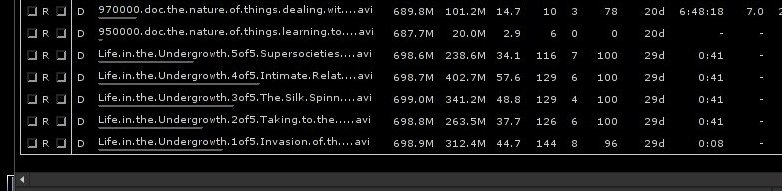
in mldonkey's web interface, a table with two cells was used to display download progress (with widths corresponding to the completed and remaining percentages). this patch simplifies the html by displaying progress as a single HR element, left aligned. effectively, it will look almost exactly as before, albeit the code will be cleaner.
|
Dennis Nezic <dennisne> |
Depends on the following items: None found
Items that depend on this one: None found
There are 0 votes so far. Votes easily highlight which items people would like to see resolved in priority, independently of the priority of the item set by tracker managers.
Follow 8 latest changes.
| Date | Changed by | Updated Field | Previous Value | => | Replaced by |
|---|---|---|---|---|---|
| 2007-04-24 | meto | Attached File | - |  |
Added vd_completion_and_chunk_bar_background.patch, #12586 |
| 2006-07-14 | dennisne | Attached File | - | |
Added sample.html, #10343 |
| 2006-07-12 | spiralvoice | Status | Wont Do | |
In Progress |
| Open/Closed | Closed | |
Open | ||
| 2006-06-12 | spiralvoice | Open/Closed | Open | |
Closed |
| 2006-03-19 | spiralvoice | Status | None | |
Wont Do |
| 2006-03-17 | dennisne | Attached File | - | |
Added sshot_hr_in_firefox.jpg, #6051 |
| 2006-03-17 | dennisne | Attached File | - | |
Added vd_completion_bar_hr.patch, #6047 |

Powered by Savane 3.13-02a9.
Corresponding source code
I attached another patch that should take care of your personal CSS.